
Stash Creator
44.99USD
Package Description
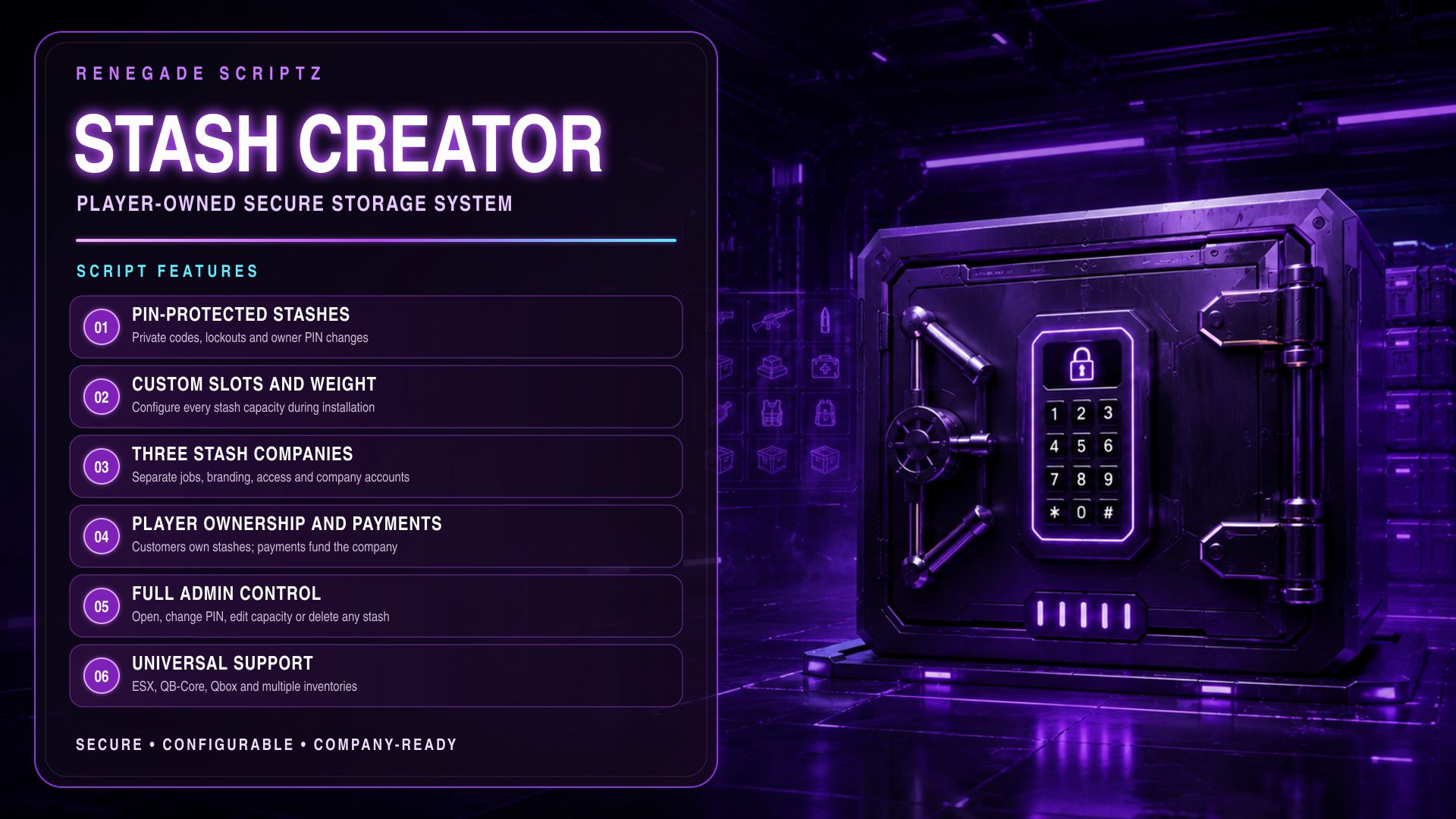
Tired of Players losing inventory because of House wipes or Vehicle wipes? Stash Creator is a storage business system that allows authorized employees to install configurable, player-owned stashes for customers. Every stash features private PIN protection, customizable slots and weight, company payments, secure ownership controls, interactive marker placement, and a powerful purple-neon admin dashboard.
Features:
-
Stashes are permanently assigned to the purchasing player.
-
Customers must approve the installation before being charged.
-
The customer privately creates the PIN—the installer never sees it.
-
Owners can change their PIN through the stash NUI.
-
The current PIN is required before an owner can create a new PIN.
-
Owners can delete their own stashes with confirmation.
-
Configurable maximum number of stashes per player.
-
Automatic stash names starting with
Stash #1and continuing upward.
Secure PIN Protection
-
Every stash requires a private numeric PIN.
-
Configurable minimum and maximum PIN length.
-
PINs are never sent back to the client or NUI.
-
Salted SHA-256 PIN storage with a private server-side pepper.
-
No plain-text PINs are stored in SQL.
-
Configurable maximum incorrect PIN attempts.
-
Timed lockout after too many incorrect attempts.
-
Changing a PIN immediately revokes previous access tokens.
-
Owners, employees, and company bosses cannot normally bypass a PIN.
-
Server-side distance checks prevent remote player access.
-
Built-in keypad sounds for every PIN button.
-
Correct PIN confirmation sound.
-
Incorrect PIN warning sound.
Configurable Stash Capacity
-
Choose the number of inventory slots during installation.
-
Choose the maximum stash weight during installation.
-
Configurable minimum and maximum slot limits.
-
Configurable minimum and maximum weight limits.
-
Server validates every submitted slot and weight value.
-
Licensed admins can increase or decrease slots later.
-
Licensed admins can increase or decrease maximum weight later.
-
Capacity changes are saved permanently in SQL.
-
Capacity changes synchronize with the configured inventory adapter.
-
ox_inventory prevents reducing capacity below occupied slots.
-
ox_inventory prevents reducing capacity below the current stored weight.
-
Existing inventory items are never automatically deleted by capacity changes.
Three Stash Companies
Includes three independently configurable companies:
-
VaultWorks Storage —
vaultworks -
LockBox Logistics —
lockbox -
Crown Secure Storage —
crownstorage
Each company supports:
-
Separate job requirements.
-
Separate employee minimum grades.
-
Separate boss grades.
-
Separate company accounts.
-
Separate installation prices.
-
Separate office locations.
-
Separate marker colors.
-
Separate labels, taglines and initials.
-
Separate NUI colors and branding.
-
Separate company stash lists.
-
One or multiple authorized jobs per company.
Employee and License Access
-
Company creator access can be job-restricted.
-
Company creator access can be granted through a FiveM
license:identifier. -
Master licenses can access all three companies.
-
Company licenses can access one specific company.
-
Licensed admins can use the full admin system.
-
Placeholder licenses containing
xxxxxxxxare safely ignored. -
/stashcreatoropens the company creator. -
/adminstashcreatoropens the admin-enabled creator. -
Employees can install stashes anywhere they are authorized.
-
Optional company office creator markers.
-
Every permission is checked again on the server.
Customer Installation System
-
Installer selects a nearby customer.
-
Installer chooses slots and maximum weight.
-
Installation price is calculated on the server.
-
Price can include a base price, price per slot and price per kilogram.
-
Customer receives a centered purchase approval window.
-
Customer sees the total price and stash specifications.
-
Customer creates their private PIN.
-
No money is removed until the customer accepts.
-
Declining the offer cancels the installation.
-
Installation offers automatically expire.
-
Failed installations can safely refund the customer when required.
Interactive Marker Placement
-
Live world marker preview before sending the customer offer.
-
Compact bottom-right placement controller.
-
Transparent placement background that does not block gameplay.
-
Move the marker forward, backward, left or right.
-
Raise or lower the marker height.
-
Rotate the marker in either direction.
-
Use clickable NUI controls or keyboard arrow keys.
-
Hold the right mouse button and drag to swivel the camera.
-
Live placement coordinates displayed in the NUI.
-
Configurable movement, height and rotation steps.
-
Configurable maximum placement distance.
-
Server independently validates the final coordinates.
-
Prevents new stashes from being placed too close to existing stashes.
-
Confirming sends the completed offer to the customer.
-
Canceling returns to the creator without losing entered form values.
-
Protected against placement errors when using Confirm, Cancel, ESC or closing the NUI.
Company Payments
-
Customers pay the company when purchasing a stash.
-
Supports an internal cross-framework company account.
-
Company employees can view the current company balance.
-
Only the configured boss grade or authorized license can withdraw money.
-
Withdrawals are deposited into the player’s bank account.
-
Optional framework society-account deposits.
-
Supports
esx_addonaccount. -
Supports
qb-banking. -
Supports
qb-management. -
Failed society deposits safely fall back to the internal company account.
-
Company money is never silently discarded.
Admin All Stashes Dashboard
Licensed admins receive a dedicated All Stashes section containing every active stash created by every company.
Admin features include:
-
View every active stash.
-
Search all stashes.
-
Filter stashes by company.
-
View stash owner information.
-
View company information.
-
View current slots and maximum weight.
-
Open any stash without its PIN.
-
Change the PIN of any stash.
-
Increase or decrease slots.
-
Increase or decrease maximum weight.
-
Delete any stash.
-
Perform admin actions remotely.
-
Server-side license verification for every admin action.
-
Admin PIN bypasses logged to SQL.
-
Admin actions printed to the server console.
-
NUI modifications cannot grant unauthorized admin access.
Stash Management and Deletion
-
Owners can delete their own stashes.
-
Authorized company staff can delete their company’s stashes.
-
Master licenses can delete any stash.
-
Licensed admins can delete any stash from All Stashes.
-
Delete confirmation prevents accidental removal.
-
Deleted markers and player access are immediately removed.
-
Uses safe soft deletion.
-
External inventory item rows are not instantly erased.
-
Deleted stashes are removed from active player lists.
Purple-Neon NUI
-
Premium purple-neon interface.
-
Separate company themes and branding.
-
Creator dashboard.
-
Customer purchase window.
-
PIN access window.
-
Owner PIN-change window.
-
Admin All Stashes dashboard.
-
Admin capacity editor.
-
Company balance and withdrawal controls.
-
Nearby customer selector.
-
Live placement controller.
-
Centered approval windows.
-
Responsive sizing for smaller resolutions.
-
Transparent placement HUD.
-
Scroll support where needed.
-
Stale loading states are cleared when reopening the NUI.
-
Inventory can be closed and reopened without becoming stuck on “Please Wait.”
Framework Support
-
ESX
-
QB-Core
-
Qbox
-
Standalone servers through the custom bridge
-
Automatic framework detection
-
Manual framework selection available in the configuration
Inventory Support
-
ox_inventory
-
qb-inventory
-
ps-inventory
-
lj-inventory
-
qs-inventory
-
codem-inventory
-
core_inventory
-
origen_inventory
-
Additional inventories through
Config.Custom -
Automatic inventory detection
-
Manual inventory selection available
-
ox_inventory direct-open protection for stronger stash security
Database and Auditing
-
Uses oxmysql.
-
Automatically creates the required stash tables.
-
Manual SQL installation is also supported.
-
Permanent stash ownership and settings.
-
Permanent company balances.
-
Permanent capacity changes.
-
Transaction history for stash sales.
-
Transaction history for withdrawals.
-
Transaction history for deletions.
-
Transaction history for admin PIN changes.
-
Existing stashes remain available after resource updates.
-
Safe database-backed soft deletion.
Configurable Settings
Server owners can configure:
-
Framework.
-
Inventory system.
-
Admin licenses.
-
Company licenses.
-
Master licenses.
-
Company jobs.
-
Employee minimum grades.
-
Boss grades.
-
Company account mode.
-
Company names and branding.
-
NUI theme colors.
-
Marker colors.
-
Office locations.
-
Installation pricing.
-
Default slots and weight.
-
Minimum and maximum slots.
-
Minimum and maximum weight.
-
Maximum stashes per player.
-
PIN length.
-
Failed PIN attempts.
-
Lockout duration.
-
Interaction distance.
-
Marker draw distance.
-
Marker placement distance.
-
Movement and rotation speed.
-
Cash or bank payments.
-
Custom framework and inventory bridge functions.
Modules
Top Customer
Recent Payments
-

ONE-DREAM
-

rolliedabrat
-

Terrence_Cookson
-

iayze1
-

kinglowki